PDF chat is useful, but it often stops too early
Asking AI questions about a PDF can be much faster than repeatedly searching a long document. You can ask for a summary, locate a key argument, compare two sections, or pull out points relevant to a report.
The answer is only the beginning. If the response is useful, you still need to save it, connect it to other findings, decide where it belongs, and turn it into usable work.
The real PDF workflow problem
Most document-heavy tasks involve more than asking one question. Researchers, students, analysts, writers, and consultants often need to:
- keep useful answers without searching through a long chat later;
- separate strong findings from exploratory or unhelpful responses;
- compare takeaways from different parts of a PDF;
- collect notes around the sections of a larger document;
- turn source-based answers into a summary, report, or draft; and
- review the result against the original source before sharing it.
When every useful response has to be copied into a separate notes app or word processor, the chat may save reading time while creating a new assembly problem.
A practical manual workflow for PDF research
You can make PDF question-and-answer work more manageable even without a dedicated workspace:
- Write down the outcome you need before asking questions.
- Ask narrow questions tied to a topic, section, or decision.
- Paste only useful answers into a structured notes document.
- Add a heading and source reminder as soon as you save each answer.
- Group the notes by the sections of your intended output.
- Check important claims against the PDF, then edit the final document.
This works, but it still depends on manual copying and filing. N0 Local brings source material, questions, saved answers, document assembly, and export into one Windows workspace.
A better workflow for PDFs: ask, save, assemble, export
A better approach is simple: treat AI answers as working material rather than disposable chat messages.
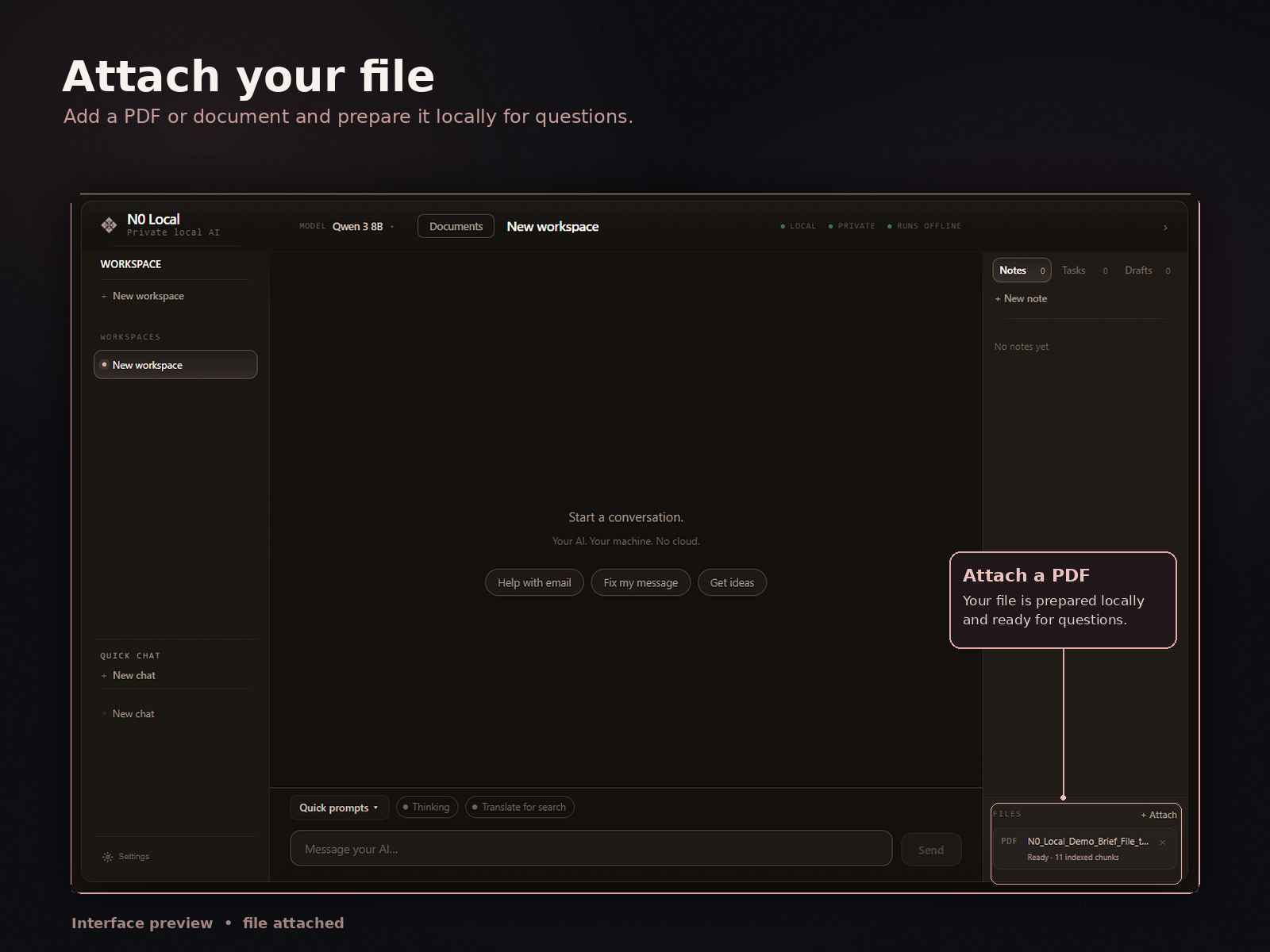
- Attach the PDF. Start with the source document you need to understand or use.
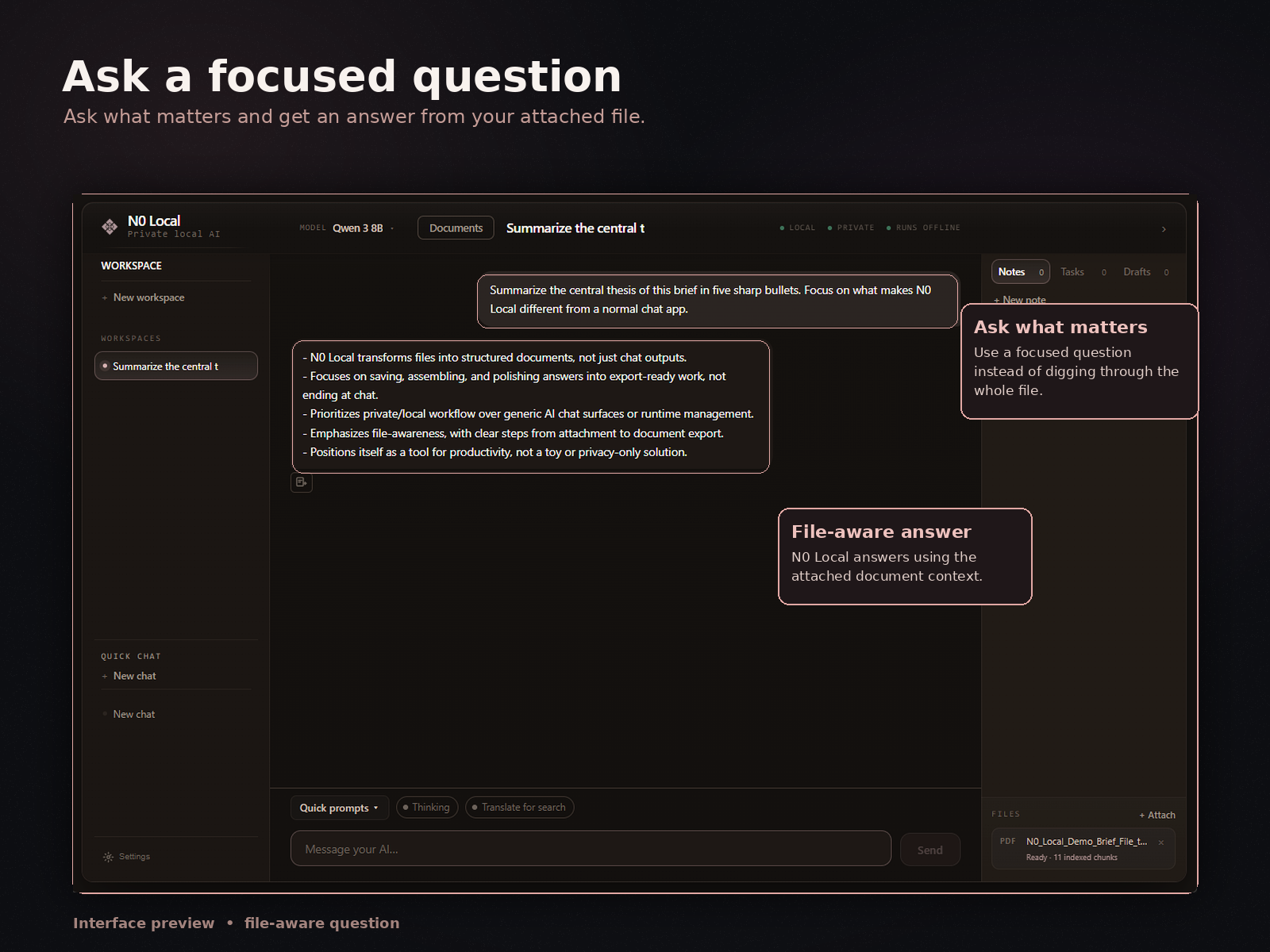
- Ask targeted questions. Ask about the facts, themes, decisions, takeaways, or sections relevant to your task.
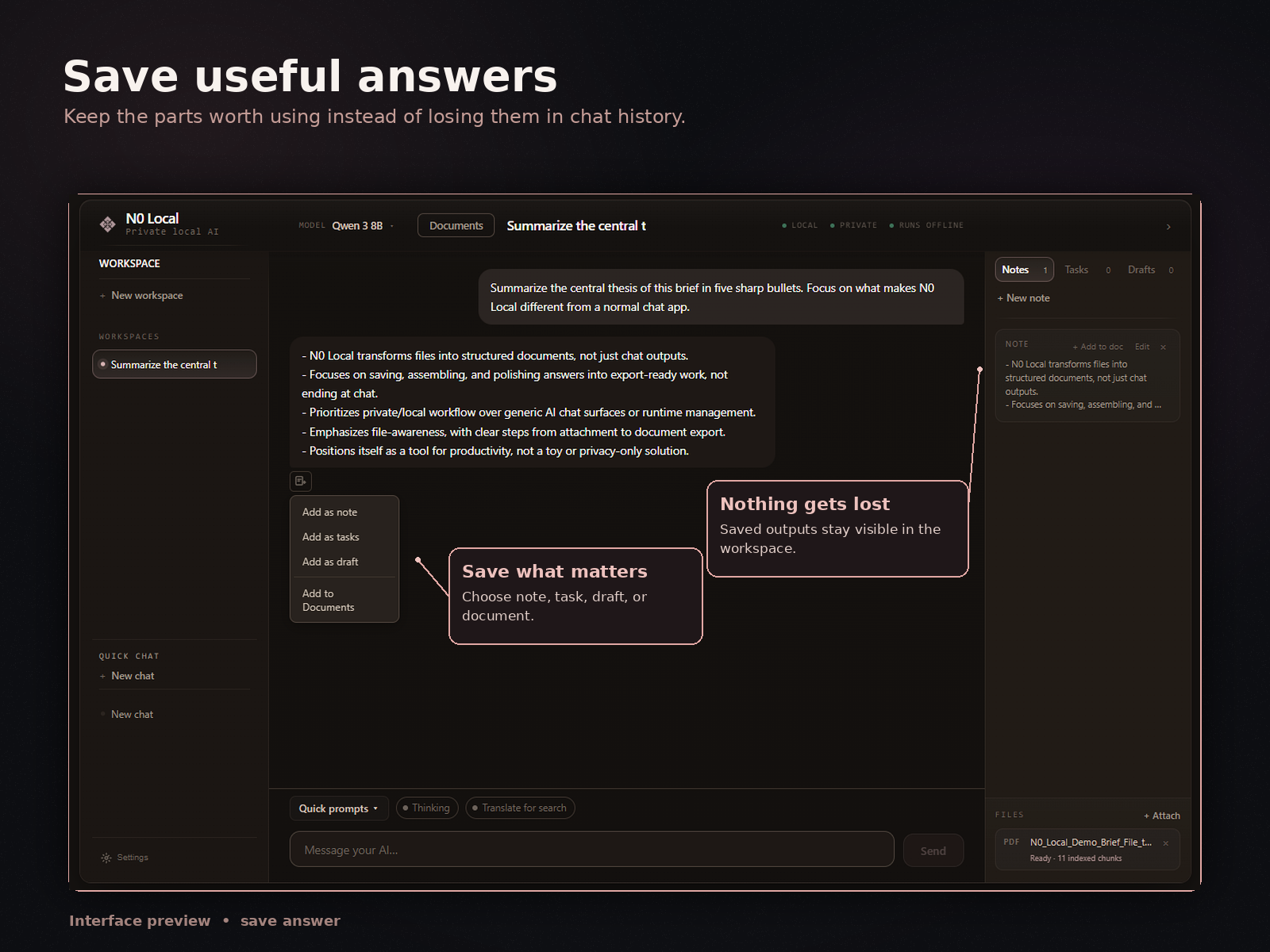
- Save only useful answers. Keep the responses that deserve a place in your notes or final output.
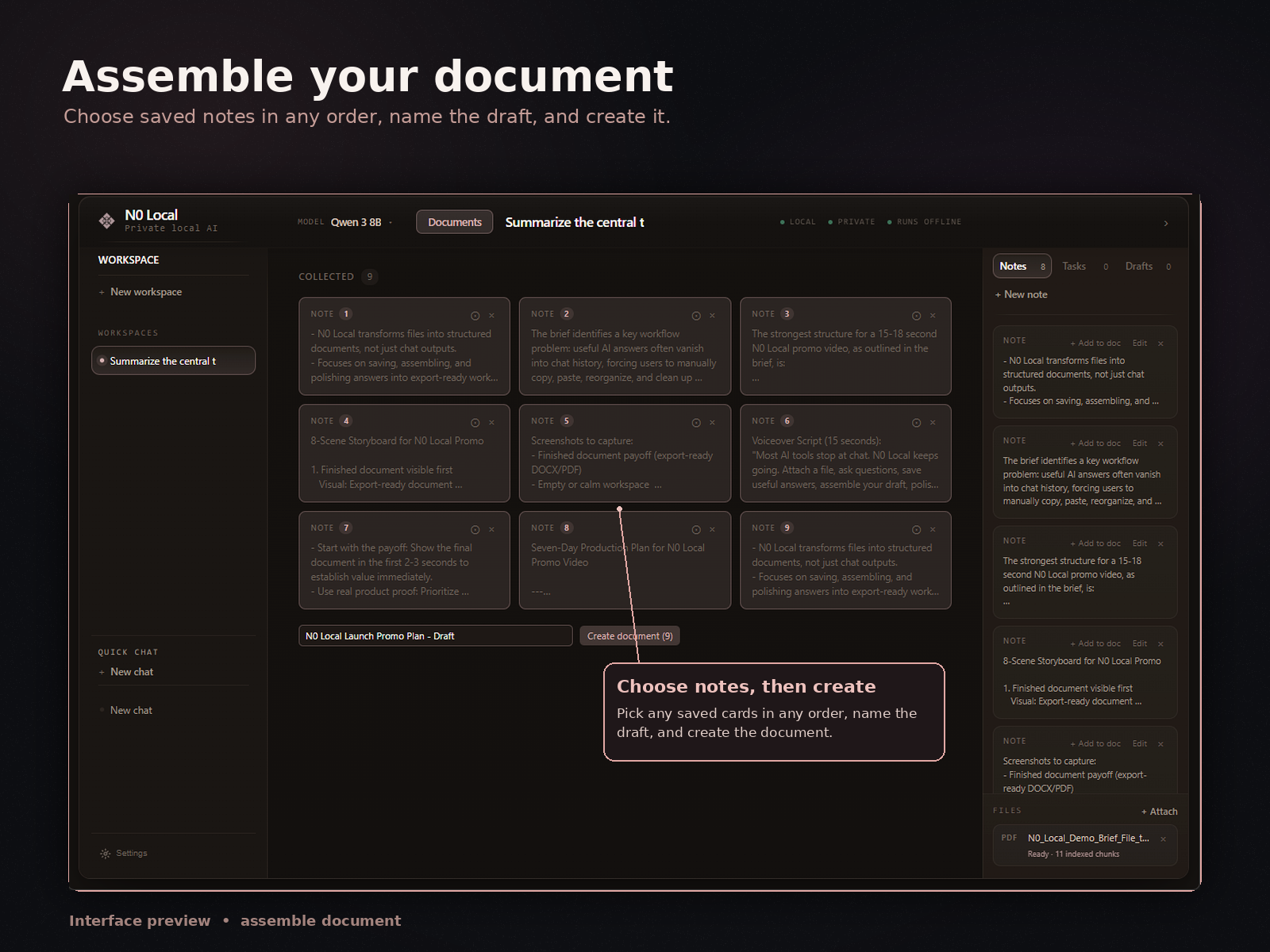
- Collect related outputs. Bring connected summaries, findings, and draft sections together.
- Assemble and edit a document. Arrange the saved material into a summary, report, brief, checklist, or draft, then review and rewrite it.
- Export to Word or PDF. Produce a real document for final editing, sharing, or delivery.
This workflow keeps the convenience of PDF chat while giving useful answers a clear place in the document you are building.
From a useful PDF answer to a working document
N0 Local is designed around what happens after an answer is worth keeping. Save it, collect it with related material, assemble the document, and export after you have reviewed and edited it.
How N0 Local helps with PDF document work
N0 Local is a private local AI workspace for Windows. You can attach source material, ask AI questions, save useful answers, collect saved outputs, assemble a real document, edit it, and export to Word or PDF.
PDFs can be part of a broader project alongside Word documents, notes, drafts, and reports. That makes N0 Local useful when the goal is not simply to chat with one PDF, but to turn source material into a document you can edit and export.
Most AI tools stop at chat. N0 Local focuses on the workflow from answer to document.
7-day free trial. No monthly subscription after purchase.
Useful ways to work with PDF answers
The workflow is a good fit when you need reusable output rather than a one-off response.
- Summaries: collect the main points from a long document, then shape them for a specific reader.
- Research notes: save focused findings under the topics you plan to investigate or write about.
- Report sections: gather source-based material before arranging and rewriting it into a section.
- Draft documents: turn selected answers into a rough structure that you can edit and verify.
- Checklists: extract relevant actions or requirements, then check them against the original PDF.
- Comparisons: collect answers about different themes or sections before drawing your own conclusions.
AI can help you navigate and organize source material, but you remain responsible for checking important details and deciding what belongs in the final document.
Honest limitations when asking AI about PDFs
Normal text-based PDFs usually provide the cleanest input. Even then, the quality of an AI answer can vary with the document, the question, and the available context. Verify important names, numbers, quotations, and conclusions against the source.
For scanned or image-based PDFs, N0 Local can use OCR, but results depend on scan quality, language, layout, and document condition. Poor or unusual source material may require extra checking and correction.
N0 Local does not remove the need for review. It provides a workspace for asking questions, keeping useful results, and turning them into a document; it does not guarantee that every PDF will be extracted or interpreted perfectly.
FAQ
Can I ask AI questions about PDFs in N0 Local?
Yes. You can attach a PDF in N0 Local, ask focused questions about it, and save the useful answers. Normal text-based PDFs usually give the cleanest results.
Can I save useful AI answers instead of copying them manually?
Yes. N0 Local lets you save useful AI answers inside the workspace, collect the outputs you want to keep, and use them when assembling a document.
Can I turn saved answers into a Word or PDF document?
Yes. You can collect saved answers, assemble and edit a document, then export it to Word or PDF. Review and verify the document before using or sharing it.
Is N0 Local only for PDFs?
No. N0 Local is built for document-heavy work with PDFs, Word documents, notes, drafts, reports, and other source material.
Can N0 Local work with scanned PDFs?
N0 Local can use OCR for scanned or image-based PDFs, but results depend on scan quality, language, layout, and document condition. Text-based PDFs usually give the cleanest results.
Is N0 Local the same as an online PDF chat tool?
No. N0 Local is a private local AI workspace for Windows. It is designed to help you move beyond PDF chat by saving useful answers, assembling a real document, editing it, and exporting to Word or PDF.
Turn useful PDF answers into something you can use
Ask questions about your source material, save the answers that matter, assemble a document, and export it to Word or PDF from your Windows PC.
7-day free trial. No monthly subscription after purchase.